
Telesales (List)
The Telesales screen displays a list of Telesales Opportunities that can be sorted and filtered for selection or reassignment, and is accessed via the Telesales entry in the CommTrak Main Menu.
This article contains the following sections:
New Telesales Opportunity (Enter / Import)
Telesales Opportunity Reassignment (and Deletion)
Please contact CommTrak Support for access to the Telesales module; it is not enabled by default.
My Statistics
This section presents today's statistics for the currently signed-in user.

Opportunities Open
The number of opportunities that are currently open.
Calls Made
The number of calls that have been made today.
Successful Today
The number of opportunity contacts that have resulted in a sale or lead generation.
Unsuccessful Today
The number of opportunity contacts that have not resulted in a sale or lead generation.
New Telesales Opportunity (Enter / Import)
There are two ways to create Telesales Opportunities:
- Manually enter a New Opportunity
- Import Opportunities from a CSV file
New Opportunity
Clicking expands the New Telesales Opportunity section of the Telesales screen, enabling the user to enter the opportunity details:

- Company Name
- Main Phone
- State
creates the opportunity and immediately presents the Telesales Opportunity screen for newly-entered opportunity.
resets the fields for the new opportunity and collapses the New Telesales Opportunity of the Telesales screen.
Import from CSV
Clicking expands New Telesales Opportunity section of the Telesales screen, presenting fields to enable the user to import opportunities from a CSV (comma separated value) file.
This feature is only available to users with specific permissions (e.g. Telesales Manager, Supervisor).
Please refer to the article Telesales Opportunities Import for detailed information about the CSV import feature.
Telesales Opportunity Search
This section presents a number of criteria that can be specified for searching the Opportunities list.

Status
Select one of:
- Active
- Successful
- Unsuccessful
Last Call Outcome
Restrict the search to opportunity records with the selected Last Call Outcome.
Created Between
Restrict the search to opportunity records created (or imported) between the specified date range.
Start Date Between
When assigning Telesales Opportunities, the Telesales Manager can specify a Start Date; this is the date upon which the opportunity will become visible in the Teleappointer's Telesales Opportunity list.
This search criterion restricts the results to opportunity records with a Start Date between the specified date range.
Follow-Up Between
During a Telesales call, the Teleappointer can specify a follow-up date for future contact.
This search criterion restricts the results to opportunity records with a Follow-up Date between the specified date range.
Search Criteria 1-5
Up to five additional criteria can be specified for the customer search. Initially, only one additional criterion is visible, but additional criteria may be added by clicking the button, or removed by clicking the button.
Each criterion is specified by selecting the search field, the type of match required, and the text against which the search criterion is to be matched.
Available field types are:
- Address
- Company Name
- Flag
- Postcode
- Promotion
- Sales Rep
- Sourced From
- Suburb
- Teleappointer
- Contains
- Equals
- Starts with
- Is not empty
- Doesn't contain
- Doesn't equal
- Doesn't start with
- Is empty
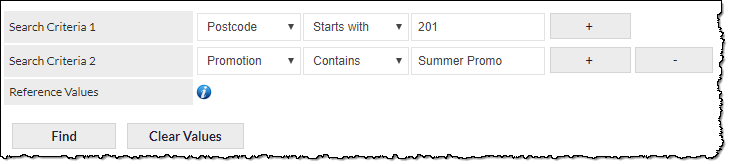
The search criterion text field is not case-sensitive.
References Values
Clicking the blue Reference Values information (i) icon displays a pop-up window listing promotion names and the number of opportunities in those promotions.
executes the search, and updates the Telesales Opportunities list in the Telesales Opportunities section of the screen.
resets all the search criteria fields. Prior to the fields being reset, you will be prompted to confirm your action. If confirmed, all of the search criteria will be reset, and the Telesales Opportunities list will refresh.
Telesales Opportunities Reassignment (and Deletion)
This section provides features for bulk-reassigning or deletion of Telesales Opportunities.
The Telesales Opportunities section is only visible to CommTrak users with specific permissions. If you require access to the Telesales Opportunities Reassignment section, and are unable to see it, please contact your organisation's CommTrak Administrator.
Bulk Reassigning Telesales Opportunities
Bulk reassignment is irreversible! Please refer to the article Bulk Selection of Records prior to using the bulk-reassignment features, to ensure that you have a full understanding of the bulk-selection options prior to clicking a reassignment button.
The process for bulk-reassigning Telesales Opportunity records is:
- Select the Telesales Opportunity record(s) to reassign
- Select one criterion for reassignment
- Click the button adjacent to the selected criterion
Field Reassignment
The fields available for reassignment are:
- Teleappointer
- Sales Rep
- Copy to Promotion
- Move to Promotion
- Telesales Flags
- Start Date
- Due Date
- Follow-Up Date
Telesales Flags Assignment
Telesales Flags can be assigned or removed in bulk, in as similar manner to the standard field assignments:
- Select the Telesales Opportunities records to reassign
- Select one or more Telesales flags to add or remove from the selected Telesales Opportunities' records
- Click the or the button, adjacent to the Telesales Flags field, as required
Example Reassignment
In this example, we will reassign selected Telesales Opportunity records to the specified Teleappointer.
- In the Telesales Opportunities section (the final section in the Telesales screen), select one or more Telesales Opportunities by ticking the box in the second column. You can select / deselect all Telesales Opportunities records on the page by ticking / unticking the box in the second column-header.
- In the Telesales Opportunities Reassignment section, select the name of the Teleappointer to whom the selected Telesales Opportunities are to be reassigned.
- Click the button adjacent to the Teleappointer drop-down list.
Bulk Deleting Telesales Opportunities
Deleting Telesales Opportunities is irreversible; once deleted, Telesales Opportunities cannot be recovered, and must be either re-entered manually, or re-imported into the Telesales module. Please refer to the article Bulk Selection of Records prior to using the bulk-deletion feature, to ensure that you have a full understanding of the bulk-selection options.
The process for bulk-deleting Telesales Opportunity records is:
- Select the Telesales Opportunity records to delete
- Click the button adjacent to the Deleted Opportunities field label
Telesales Calls in Progress
This section displays a list of Telesales calls in progress (if any). The information displayed will vary depending on the status of the call in progress.
The Telesales Calls in Progress section is only visible to CommTrak users with specific permissions. If you require access to the Telesales Calls in Progress section, and are unable to see it, please contact your organisation's CommTrak Administrator.
Call in Progress, Not Ended
If a Telesales call is in progress, but has not been ended, the following information is displayed for the call:
- Staff Name
- Call Start
- End Time (always blank)
- Company Name
Call in Progress, Ended, but not Submitted
If a Telesales call is in progress, and has been ended (but not submitted), the following information is displayed for the call:
- Staff Name
- Call Start
- End Time
- Company Name
If the call has been ended, but not submitted, the call-in-progress item can be clicked to display a pop-up window with the following fields:
- Staff (read-only) - The name of the staff member who made the call
- Company (read-only) - the name of the company that was called
- Call Start - the time and date on which the call was started; this field can be edited
- End Time - the time and date on which the call was ended; this field can be edited
The following action buttons are available:
updates the call to reflect any changes to the above fields.
removes the call; no statistics will be recorded for the associated opportunity. The Telesales Opportunity record is not deleted.
Telesales Opportunities with Follow-Up Reached
During a Telesales call, the Teleappointer can specify a follow-up date for future contact. When the date for the follow-up call has been reached, the Telesales Opportunity record will be displayed in this section.
Only follow-up calls that are due today, or are overdue, will be displayed in this section, unless the Show All option (link in the section header) is clicked.
Clicking on a Telesales Opportunity in this section, will display the Telesales Opportunity screen.
For more information about viewing Follow-Ups, see the Telesales Opportunity - Follow-Up article.
Telesales Opportunities
This section displays a list of Telesales Opportunities based on the search criteria specified in the Telesales Opportunities Search section.
Depending on your permissions, you may be able to see:
- All Telesales Opportunities
- Only Telesales Opportunities assigned to you
- Telesales Opportunities assigned to you, or not assigned to anyone
The Telesales Opportunities section-header displays the number of Telesales Opportunities shown in the list, compared to the total number of Telesales Opportunities visible to the currently-signed-in user.
The columns displayed in this list can be sorted and customised; please see the Support Centre article, Column Sorting & Customisation.
Clicking on a Telesales Opportunity in this section, will display the Telesales Opportunity screen.