
Telesales Opportunity - Follow-Up
Images in this article can be clicked to display a full-size version.
The Telesales Opportunity - New Opportunity article explains how to create a Follow-Up during a Telesales call.
This article explains how to view Telesales Follow-Ups.
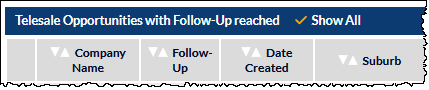
The Telesales Screen includes a section named, Telesale Opportunities with Follow-Up reached, shown in the following image:

This section presents a list of a opportunities for which the Follow-Up date has been reached.
By default, the list does not show opportunities for which the follow-up date is in the future. However, if you wish to view your future follow-ups, you can click the Show All option in the section header. An orange tick will be displayed (visible in the following image), and future follow-ups will be included in the list:
Any company name in the list can be clicked to display the opportunity, and the call can be commenced as explained in the Start the Call section of the Telesales Opportunity - New Opportunity article.