
Telesales DNC Consent
Overview
Consent allows a telesales record to be called even when its phone number is on the Do Not Call (DNC) Register. This article explains the types of consent, how consent is recorded, modified and withdrawn, and how it interacts with opt-outs, the DNC wash and merging.
Any user can record or withdraw consent. Consent history is never deleted, only added to, as required by DNC legislation.
The DNC features, including consent, are displayed only on Australian sites (country code AU).
Types of Consent
- Express consent (Express consent: the person agreed to calls) lasts 3 months by default. It can also run until a set date, or indefinitely until it is withdrawn.
- Inferred consent (Inferred consent: ongoing relationship) has a review date, which defaults to 12 months after the consent was given.
When Consent Expires
Express consent no longer counts once it expires, and inferred consent no longer counts once it passes its review date. The customer's phone number is then included in the next DNC wash.
To find customers whose consent is about to expire, use the Do Not Call consent expires between criterion in the Customer Report. See Standard Reports.
The Do Not Call Register Section
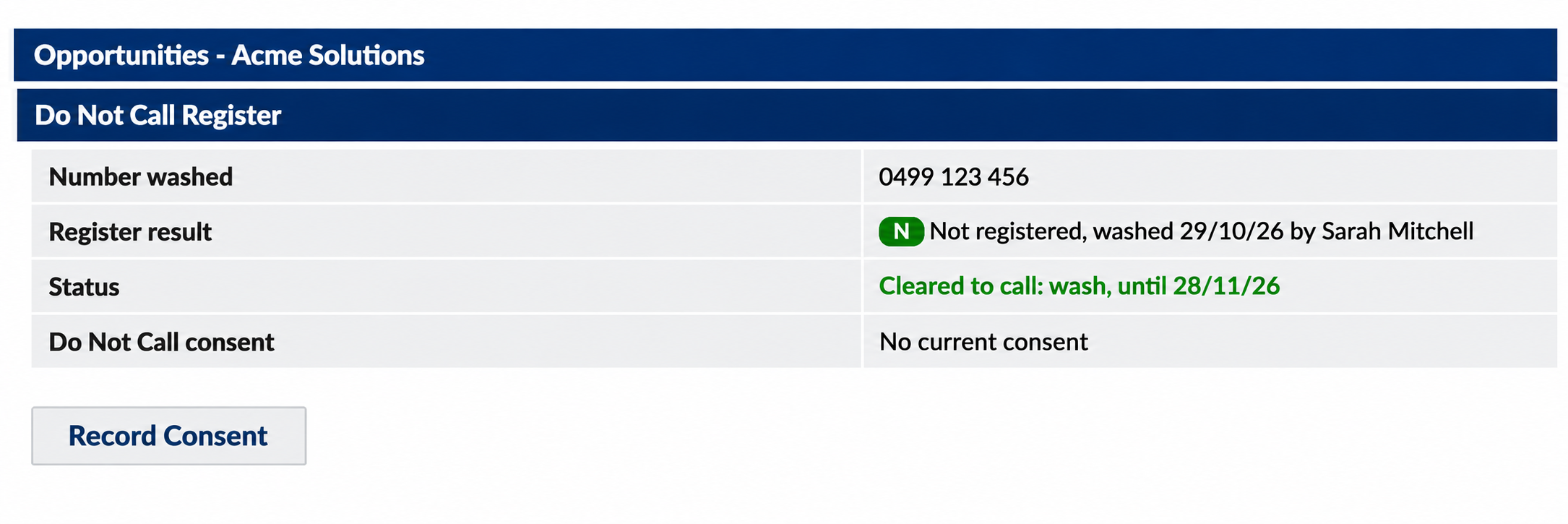
Consent is managed in the Do Not Call Register section of the Telesales opportunity screen. The section shows:
- Number washed - the phone number that is checked against the DNC register.
- Register result - the result of the most recent wash, and when and by whom it was washed.
- Status - whether the record can be called, and why. For example, Cleared to call: wash, until 28/11/26.
- Do Not Call consent - the current consent, or No current consent.
Recording Consent
- Open the opportunity and expand the Do Not Call Register section.
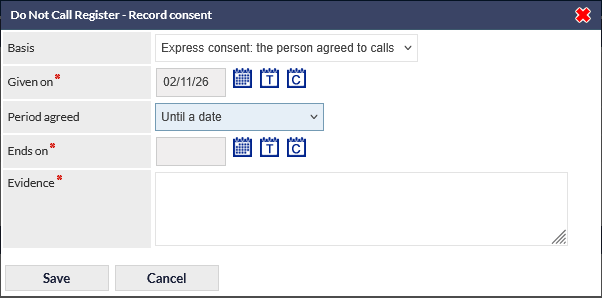
- Select Record Consent. The Do Not Call Register - Record consent window is displayed.
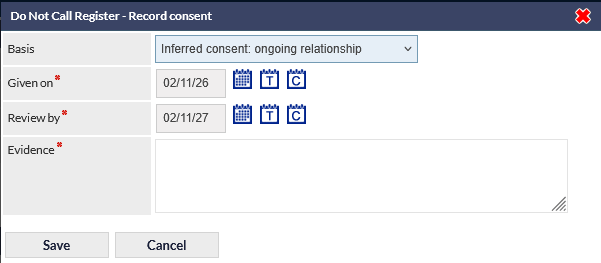
- In Basis, select Express consent: the person agreed to calls or Inferred consent: ongoing relationship.
- In Given on, enter the date the consent was given.
- For express consent, select the Period agreed. For inferred consent, enter the Review by date.
- In Evidence, enter how the consent was given, for example a request during a conversation, an email or a fax.
- Select Save.
The options available depend on the basis selected:
- Express consent, Not stated (3 months) - the consent lasts 3 months from the date it was given.
- Express consent, Until a date - the consent lasts until the Ends on date, which is required.
- Express consent, Indefinite (until withdrawn) - the consent lasts until it is withdrawn.
- Inferred consent - the Review by date is required, and defaults to 12 months after the Given on date.
The Given on and Evidence fields are required for every consent.
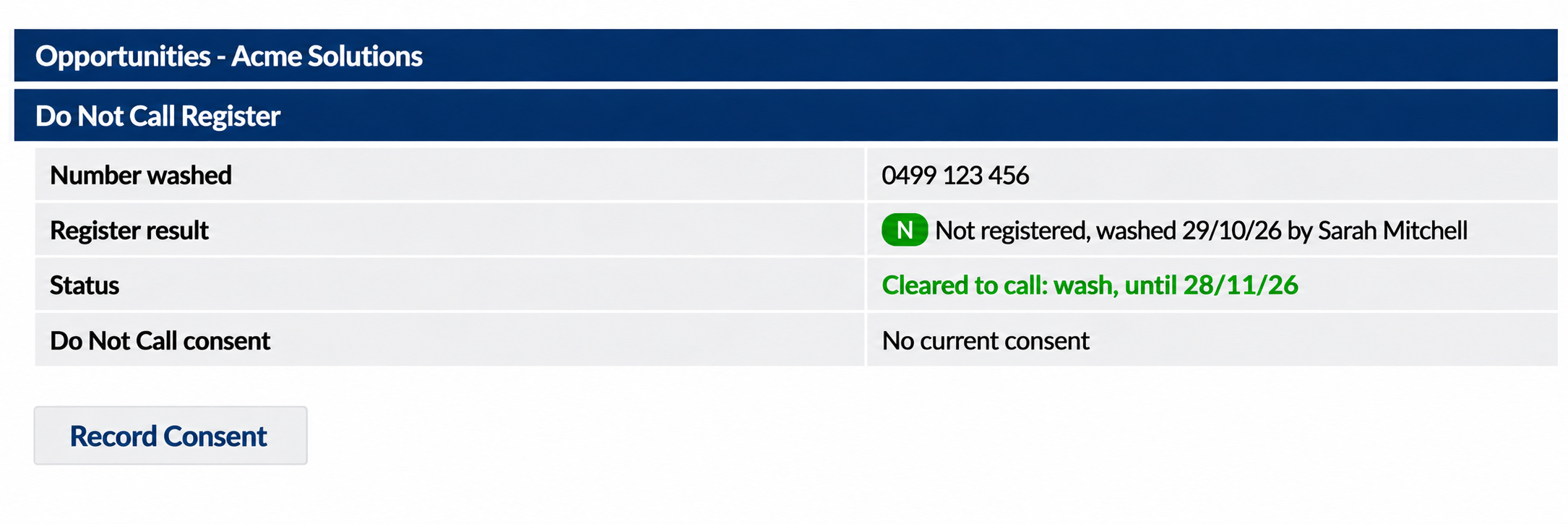
After the consent is saved, the Status row shows that the record is cleared to call because of consent, and the Do Not Call consent row shows the basis, the date given, the period, the evidence, and who recorded the consent and when.
Reviewing or Changing Consent
To review or change a consent that is current, select Modify. The Do Not Call Register - Review / change consent window displays the details of the current consent. Change the Basis, Given on, Period agreed (or Review by for inferred consent) or Evidence as required, then select Save.
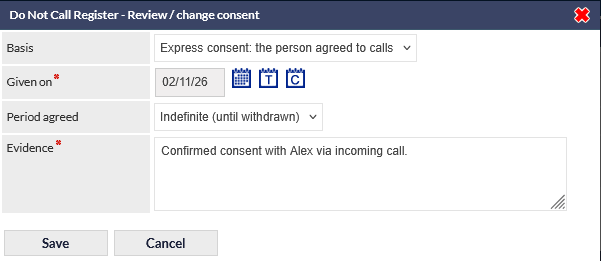
A change made with Modify is recorded as a new consent, and it appears in the consent history.
Withdrawing Consent
- In the Do Not Call Register section, select Withdraw.
- In the Withdraw consent window, enter the Reason. A reason is required.
- Select Save.
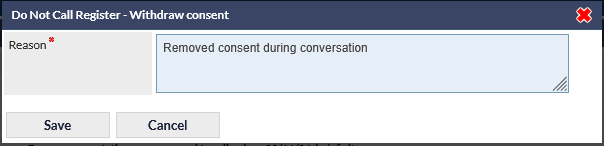
The consent no longer applies once it is withdrawn. If the number is not on the DNC register, the record can still be called. If the number is on the register, or the customer's Marketing Method is Unsubscribed, the record can no longer be called.
If consent is withdrawn by mistake, record the consent again.
When consent is withdrawn on a number that is on the DNC register, or whose wash result is invalid, the record's active opportunities are removed straight away. This happens even if you do not have permission to delete opportunities. An opportunity with no recorded calls is deleted. An opportunity with calls is disabled, and moves to the Cancelled list.
Consent History
Select History to open the Do Not Call Register - Consent history window. It lists every consent recorded for the record, with the Basis, Given, Ends, Evidence, Recorded by, Recorded on and Status. The Closed on, Closed by and Reason columns show when a consent was withdrawn, who withdrew it, and why.

The history is a record of what was done and why, and is available if the calling is ever audited.
Consent and Opt-Outs
Consent and opt-outs never coexist.
- Consent cannot be recorded on an opted-out record. The consent buttons are greyed out with a note, but Withdraw and History still work.
- While a record has current consent, the following are refused with a message telling you to withdraw the consent first:
- the Do Not Contact call outcome (the opportunity stays open)
- changing the customer's Marketing Method to Unsubscribed (the whole save is refused)
- linking the record by CIDN to an Unsubscribed customer
Consent and Calling
A record with current consent can be called, unless it is opted out. Records with current consent are left out of the DNC wash export.
For information about washing numbers, refer to Telesales DNC Wash - Export and Upload.
Merging Records
When two records or two customers are merged, the consent history moves to the record that is kept. The merge is refused if only the record being removed has current consent.
Related Information
- The Telesales opportunity screen is described in Telesales Opportunity Screen.
- Finding customers with expiring consent is described in Standard Reports.