
Telesales DNC Wash - Export and Upload
Overview
Telesales opportunities can be washed against the Do Not Call (DNC) Register to confirm that the phone numbers can be called. CommTrak exports the numbers that need washing, you wash the file through the DNC Register, and you then upload the washed file back into CommTrak. CommTrak updates the opportunities based on the result.
The DNC features are displayed on Australian sites only.
Washing Process
The process has three stages:
- Export the numbers to wash from the Telesales screen.
- Wash the exported file through the DNC Register.
- Upload the washed file, preview the result and confirm.
Accessing the Wash Options
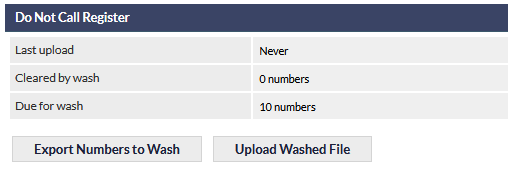
The wash options are in the Do Not Call Register section of the main Telesales screen (Telesales on the CommTrak main menu). The section is displayed only to users who have the required permissions. By default, these are the Supervisor and Telesales Manager roles.
- Last upload: the date the last washed file was uploaded, or Never if a washed file has not been uploaded.
- Cleared by wash: the number of numbers that have been washed and cleared.
- Due for wash: the number of numbers that need washing. These are the numbers included in the export.
Exporting Numbers to Wash
Select Export Numbers to Wash. Before the file is created, the Do Not Call Register - Export numbers to wash window shows:
- Numbers to wash: the number of numbers that will be exported.
- Not covered: the number of records with a 13, 1300 or 1800 number. These numbers are not covered by the DNC Register, so no wash is needed and they can be called.
- Skipped: the number of records whose number cannot be washed, such as a missing or invalid phone number. Select Download skipped list (CSV) to see the records that were skipped.
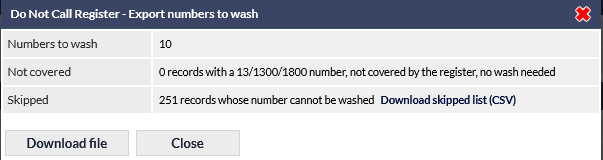
Select Download file and wash the file through the DNC Register.
Uploading the Washed File
Select Upload Washed File. In the Do Not Call Register - Upload washed file window, select Browse to choose the washed file, then select Preview. The file you upload must be in the same format as the file exported by CommTrak.

Previewing the Result
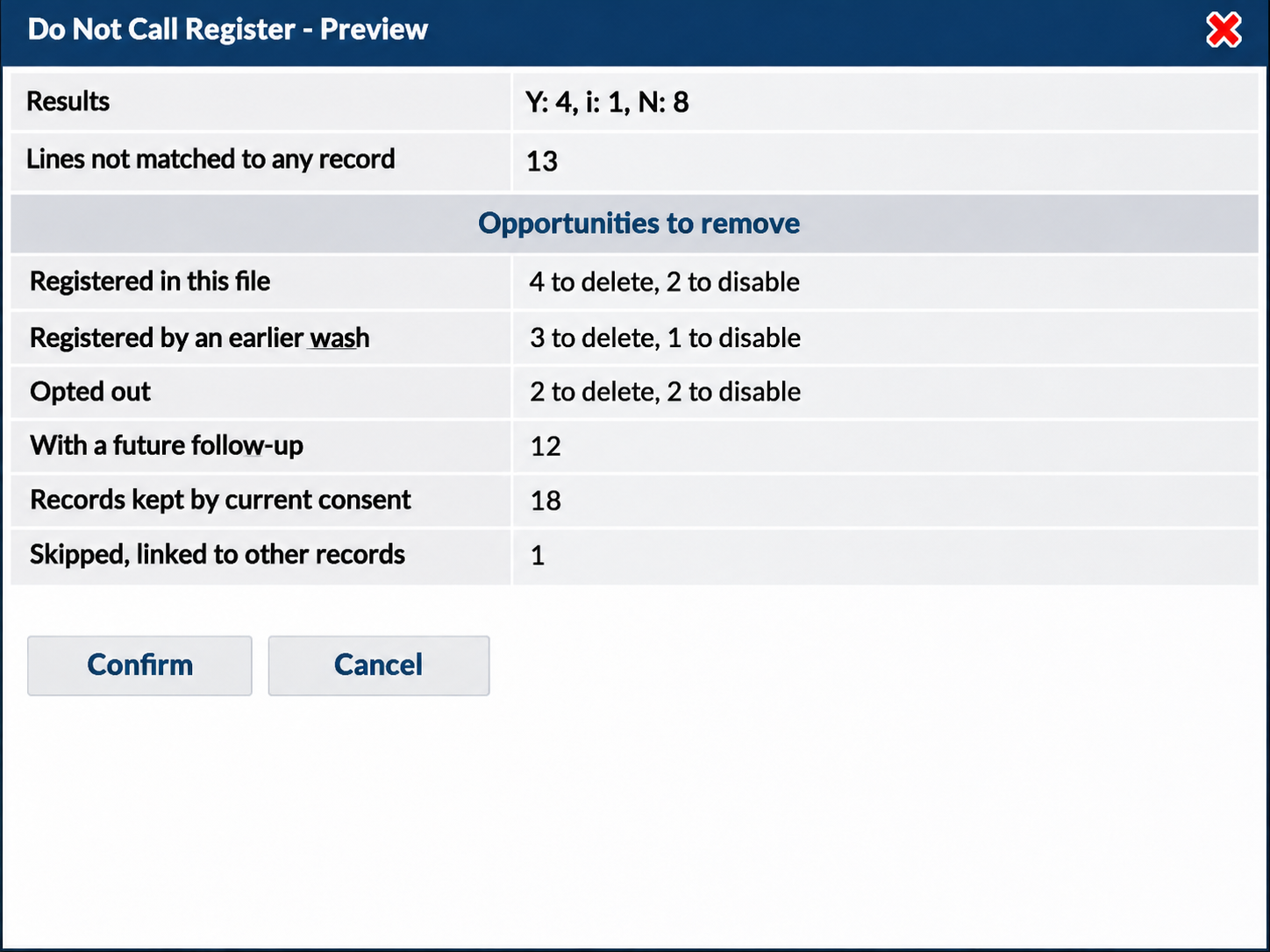
Before any changes are made, the Do Not Call Register - Preview window shows the effect of the washed file:
- Results: the number of lines in the file for each result code: Y (on the register), N (not on the register) and i (invalid).
- Lines not matched to any record: the number of lines in the file that do not match any record in CommTrak.
The Opportunities to remove section shows the effect on opportunities:
- Registered in this file: the opportunities to delete and to disable because their number is on the DNC Register in the uploaded file.
- Registered by an earlier wash: the opportunities to delete and to disable because their number was found on the register by an earlier wash.
- Opted out: the opportunities to delete and to disable because the customer has opted out of being called.
- With a future follow-up: the number of opportunities where a follow-up call has already been arranged. For example, the customer answered a call, it was not a convenient time, and they agreed to be called at a later date and time. This is treated as implicit consent.
- Records kept by current consent: the number of records that are kept because current consent has been recorded.
- Skipped, linked to other records: the number of opportunities that cannot be processed and are skipped because the number is linked to other Telesales records.
Deleted and Disabled Opportunities
Opportunities are deleted or disabled when their number is on the DNC Register or the customer has opted out:
- An opportunity with no calls recorded is deleted.
- An opportunity with calls recorded that has not been closed with a status such as Successful is disabled. For example, an opportunity with a follow-up date set. The call records remain, but the opportunity can no longer be called.
Invalid Files
If the file is not in the expected format, or contains data that CommTrak cannot understand, the preview identifies each line that has a problem and describes what is wrong. Correct the file and upload it again.
Confirming
When you are satisfied with the preview, select Confirm. CommTrak deletes or disables the opportunities as shown in the preview and displays a message when the file has been processed. Select Close to finish.
After Washing
A number that is returned as not registered can be called for 30 days from the date it was washed. The Do Not Call Register section of each washed opportunity shows the status and the date until which the number can be called, for example Cleared to call: wash, until 28/11/26.

A number that is on the DNC Register can still be called if consent has been recorded for it. The number must be washed again when the consent ends.