
Ticket Email Replies - How Replies Are Matched to Tickets
Overview
When someone replies to a ticket email, CommTrak adds the reply to the original ticket as a note. A reply is matched to an existing ticket in one of two ways:
- by the ticket number in the subject line
- as a reply to an email that CommTrak has already received or sent on that ticket
This keeps the whole conversation within the original ticket, even when the reply comes from someone other than the original sender, or when the ticket number is missing from the subject.
Reply matching applies to all tickets.
Tickets are created from emails sent to the email addresses set up in Tickets From Emails settings, for example for support, sales enquiries or complaints. This article refers to these as ticket email addresses. See Tickets From Emails (Settings).
How a Reply is Matched
When an email arrives, CommTrak checks the following in order. The first match is used.
- Ticket number in the subject. If the subject contains a ticket number, the email is added as a note to that ticket.
- Reply to an earlier email on a ticket. If the subject has no ticket number, CommTrak checks whether the email is a reply to an email it has received or sent on a ticket. This includes replies to notification emails sent to staff. The reply is added as a note to that ticket, regardless of who sent it.
- No match. A new ticket is created.
To recognise a reply, CommTrak records the email message ID of each email received by, or sent from, a ticket. The message ID is a hidden reference that every email carries.
Keeping the ticket ID in the subject is the most reliable way to have a reply added to the right ticket, because the ticket ID is always checked first.
Example: Reply All from a Copied Recipient
A customer emails a ticket email address and copies in a colleague. CommTrak creates a ticket from the email. The colleague then selects Reply All on the customer's original email. The reply has no ticket number in the subject, but it is a reply to an email recorded on the ticket, so CommTrak adds it as a note in the original ticket.
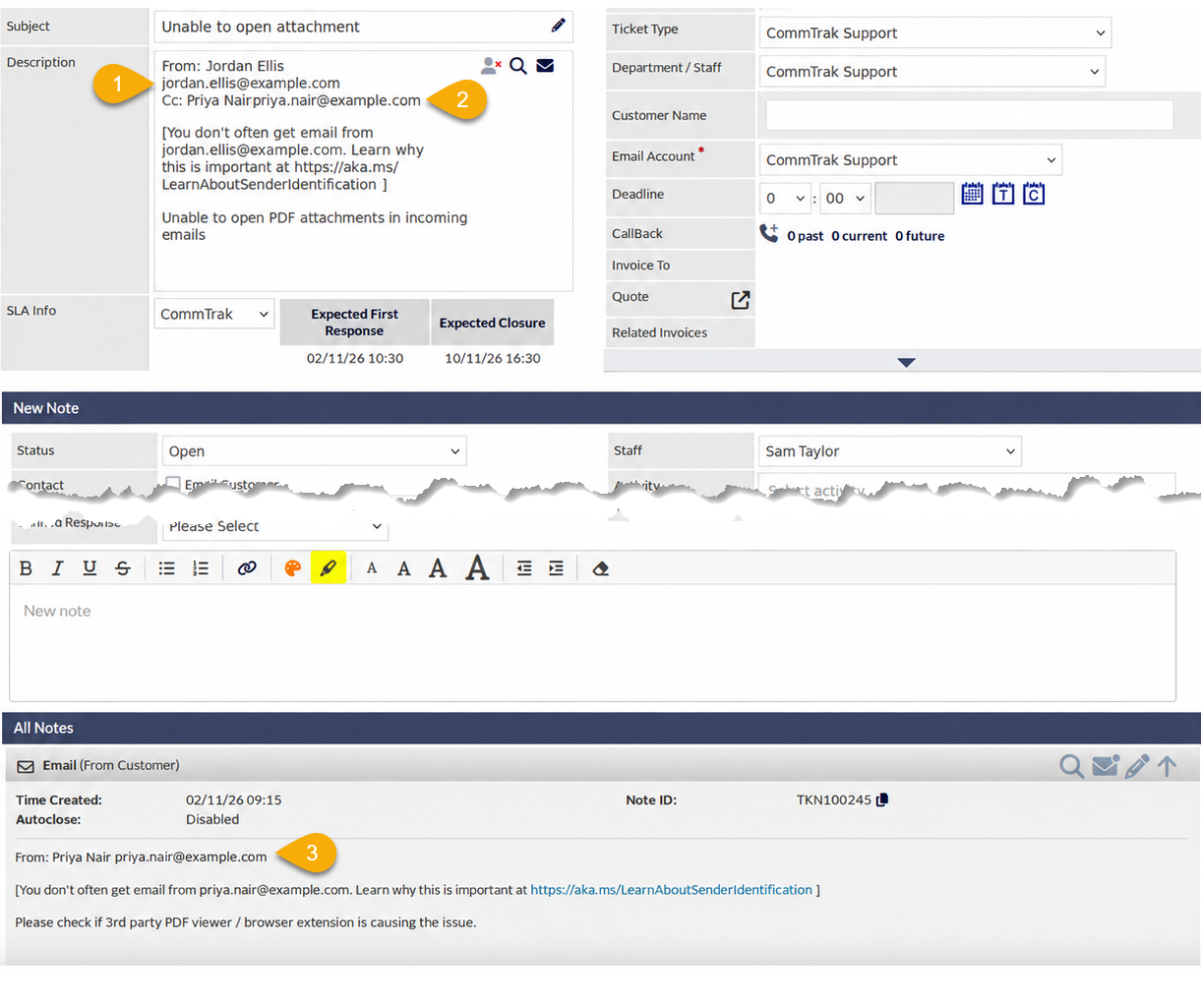
In the previous screenshot:
- is the sender of the original email.
- is the copied recipient.
- is the reply from the copied recipient, added as a note on the ticket.
Reply Notes
When an email has Cc recipients, the note shows a Cc: line under the From: line.
Automatic Replies
Out of office and other automatic replies that match a ticket are added as a note. They do not reopen the ticket, reset the Autoclose, or notify staff.
Other Behaviour
- If removing the quoted text from a reply leaves nothing, the full email is kept as the note, so the note is never empty.
- If the same email arrives twice, for example because it was sent to two ticket email addresses, it is added to the ticket only once.
- If an email quotes a ticket number that does not exist, CommTrak tries to match it as a reply to an earlier email. If there is no match, a new ticket is created.
- When tickets are merged, replies to emails from either ticket are added to the ticket that is retained during the merging process. See Merging Tickets.
- Emails in Microsoft 365 mailboxes that create tickets are processed oldest first, so that they are matched in the order in which they were sent.
Limitations
- The ticket number in the subject always takes priority. If a customer replies to an email from a ticket that has since been merged into another, and the subject contains the number of the merged ticket, the reply is added to the merged (cancelled) ticket. If Re-open closed/cancelled ticket when customer replies is set to Yes in Settings > Ticket Settings > Miscellaneous, the ticket is also reopened.
- CommTrak can only match a reply to an email it has received or sent on a ticket. If the ticket email address was added to an email conversation part way through, and someone replies to an email from before that point, a new ticket is created.
- CommTrak tracks the message IDs of a ticket for 12 months after the ticket is closed or cancelled. After that, CommTrak no longer holds them for the ticket, so a reply is matched by the ticket number in the subject only. If the subject has no ticket number, a new ticket is created.
- Replies to emails for which CommTrak does not have a message ID to track are matched by the ticket number in the subject only.
Related Information
- Tickets can be created from emails sent to a ticket email address. See Tickets From Emails (Settings).
- Notes, including emailed replies, are described in Creating / Modifying a Ticket.
- Merged tickets are described in Merging Tickets.
- The setting that reopens a closed or cancelled ticket when the customer replies is described in Ticket Miscellaneous (Settings).