
Trailing Revenue (Contracts)
Trailing Revenue Rules can be applied to contracts. Please refer to the Contracts Screen article prior to reading this article.
Before a Trailing Revenue Rule can be applied to a contract, the rule must first be configured - please refer to the article, Leads Trailing Revenue Formulas (Settings) for information about creating Trailing Revenu Rules.
Trailing revenues, as reported in the Sales Dashboard are calculated based on the trailing revenue formulas that are specified at the time the contract is confirmed.
If your organisation requires that Sales Dashboard data reflects changes that are made to trailing revenue formulas mid-contract, please advise CommTrak Support.
When creating a contract, a monthly duration or a Trailing Revenue Rule can be applied:
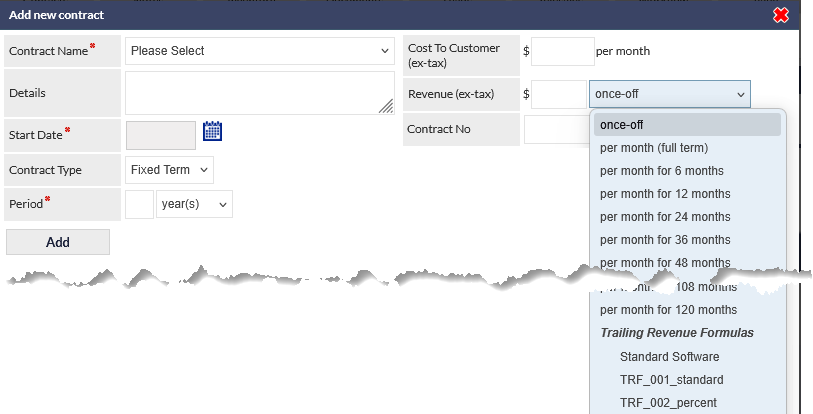
As shown in the previous image, either select a monthly duration, or select a Trailing Revenue Formula.
When a Trailing Revenue Formula is selected, the rules are displayed in the Revenue field.
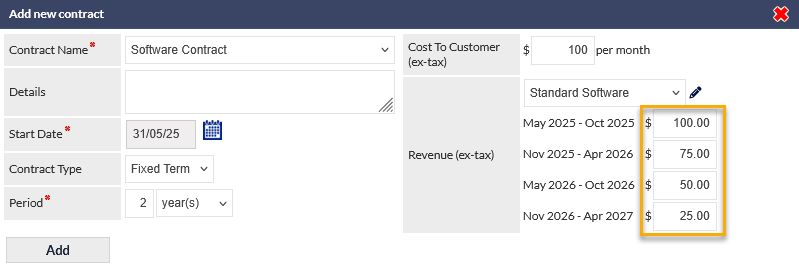
Prior to adding the contract, or when modifying an existing contract, the Revenue value for any period (highlighted in the previous image) can be modified by entering a new Revenue value in the required field.
Modifying the Trailing Revenue Formula
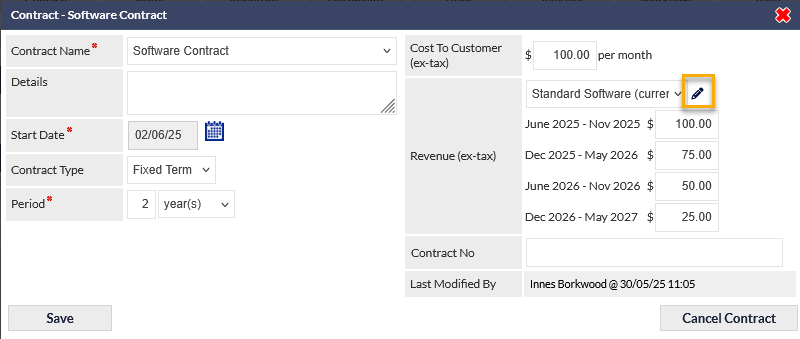
When a trailing revenue formula is selected, it can be customised either at the time of the contract creation, or at any time during the duration of the contract.
To customise the formula, press the pencil icon (highlighted in the following image):
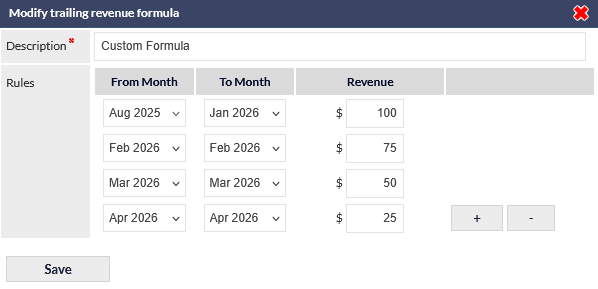
The Modify trailing revenue formula pop-up window is displayed:
Adding / Removing Trailing Revenue Rules
To add a rule, press the plus (+) icon adjacent to the last rule - a new rule with an unpopulated Revenue field is displayed:
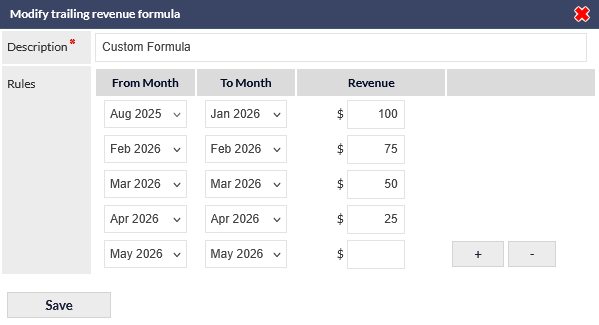
- Populate the Revenue field for the new rule, and adjust the From Month and To Month columns as required.
- To reduce the number of rules, press the minus (-) icon adjacent to the last rule and adjust the preceding rules if required.
- To cancel changes, press the red X icon, top-right of the pop-up window.
- Press Save to confirm changes.
Once saved, the new rules will apply be applied immediately for reporting purposes. The Sales Dashboard will not reflect changes that have been applied mid-contract, as the sales data is intended to reflect the calculations made at the time the contract was implemented. If your organisation requires that Sales Dashboard data reflects changes that are made to trailing revenue formulas mid-contract, please advise CommTrak Support.