
Revenue and GP Report
The Revenue and GP Report shows the revenue and gross profit generated by each Lead in a selected month, separating quoted values from the revenue and GP earned once contracts are confirmed. The report brings together one-off sales, upfront payments and ongoing monthly contract revenue in a single view.
Who Should Use This Report
The report is designed for businesses running ongoing SaS contracts, as it tracks revenue and GP across the life of each contract. Businesses that sell hardware or software on a one-off basis only will find the standard quote and lead reports sufficient.
Producing the Report
The report is produced from:
Reports > Revenue and GP Report
The criteria selection screen allows the reporting month and a number of optional filters:
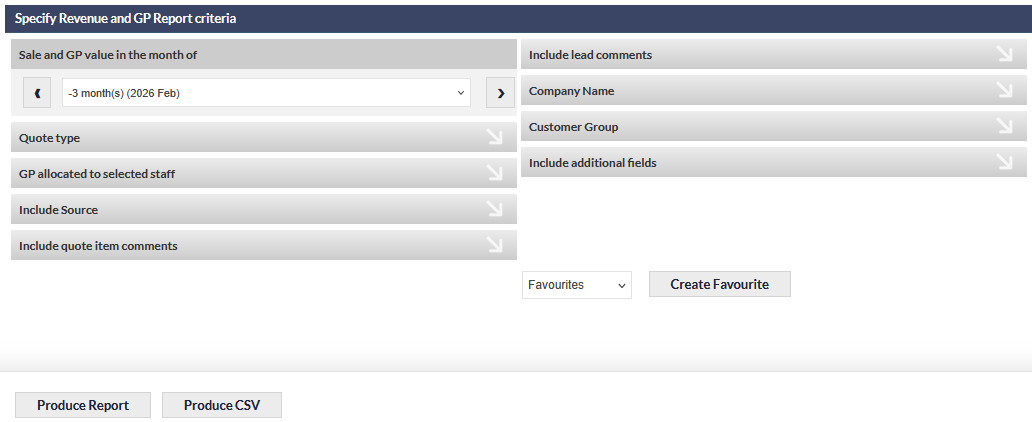
Sale and GP Value in the Month Of
This field sets the reporting month. The drop-down list can be used to select any month, or the left and right arrows can be used to step the selected month one period at a time without opening the list:
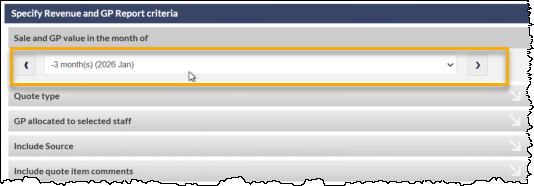
Stepping forward into future months is useful for forecasting upcoming contract revenue; stepping backward is useful for reviewing historical months.
Once the criteria are set, the Produce Report button opens the report results in a new browser tab.
Reading the Report
The report is divided into four column groups:
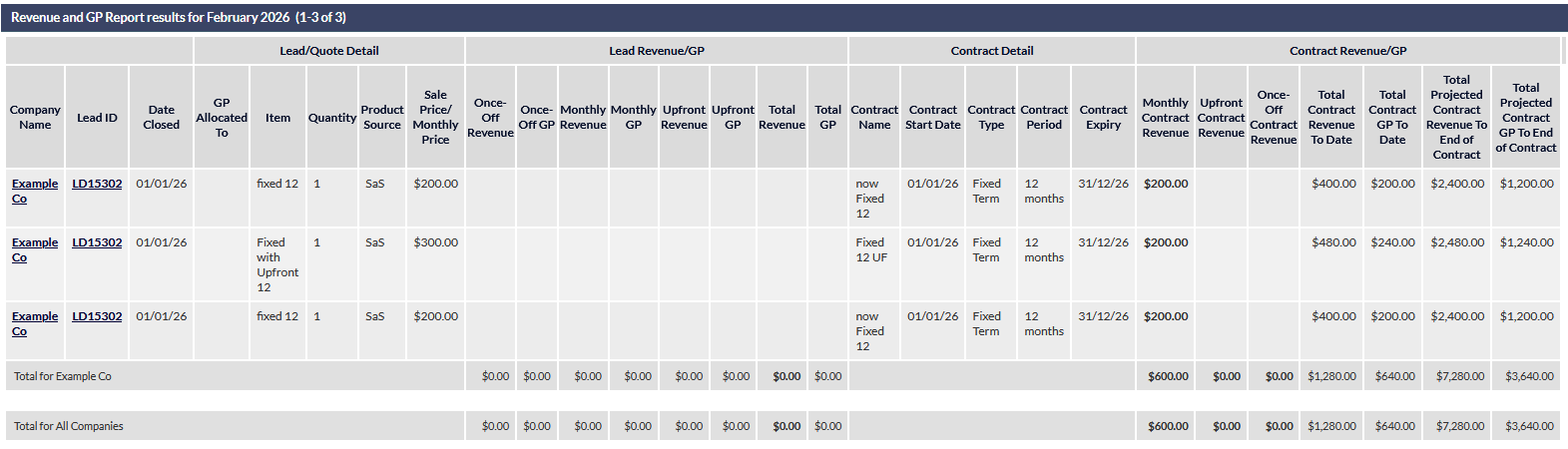
When scrolling through the Revenue and GP report, the header row is pinned to the top of the screen and remains visible as the report is scrolled.
Lead/Quote Detail
The leftmost group identifies each Lead and shows the values as they were quoted: Company Name, Lead ID, Date Closed, GP Allocated To, Item, Quantity, Product Source (SaS, hardware ad-hoc, or manually entered) and Sale Price/Monthly Price.
Lead Revenue/GP
This group shows the revenue and GP figures derived from the quote: Once-Off Revenue, Once-Off GP, Monthly Revenue, Monthly GP, Upfront Revenue, Upfront GP, Total Revenue and Total GP.
These figures populate while a Lead is still at the quote stage. Once an associated contract is confirmed, the contract becomes the source of truth for revenue and GP, and the Lead Revenue/GP values for that line are no longer reported - the figures move to the Contract Revenue/GP group on the right.
Contract Detail
For confirmed contracts, this group shows the contract metadata: Contract Name, Contract Start Date, Contract Type, Contract Period and Contract Expiry. These columns are empty for any line where the contract has not yet been confirmed.
Contract Revenue/GP
This is the rightmost group and contains the contract revenue figures most often referenced by users running SaS contracts:
- Monthly Contract Revenue - the revenue received from the contract in the selected reporting month.
- Upfront Contract Revenue - any upfront one-off payment received at contract commencement.
- Once-Off Contract Revenue - any once-off payment associated with the contract.
- Total Contract Revenue To Date - the cumulative revenue received from the contract start date through to the end of the reporting month.
- Total Contract GP To Date - the cumulative GP earned from the contract start date through to the end of the reporting month.
- Total Projected Contract Revenue To End of Contract - the revenue projected from the end of the reporting month through to the contract expiry.
- Total Projected Contract GP To End of Contract - the GP projected from the end of the reporting month through to the contract expiry.
Upfront and Once-Off contract revenue are reported in separate columns because a single contract can include both an upfront payment and an ongoing monthly fee - keeping the two in separate columns makes it clear how the Total Contract Revenue To Date figure is composed.
Confirmed vs Unconfirmed Contracts
A contract only appears in the Contract Detail and Contract Revenue/GP groups once it has been confirmed. Until that point, the SaS item remains in the Lead Revenue/GP group and is shown in bold italic, consistent with how unconfirmed contracts are displayed elsewhere in CommTrak.
It is important that a contract is confirmed using the correct start date, as the start date determines when periodic invoicing begins and when contract revenue accrues. CommTrak recommends that confirming the contract, and setting the start date, becomes a mandatory step in the accounts workflow when periodic payments are set up for a contract.
If a contract is confirmed using today's date but should have started earlier, the start date can be edited on the contract itself. Running the report again will then reflect the revised start date and any back-dated revenue.
Totals
Two totals lines are shown beneath the detailed rows:
- Total for Company Name - subtotal of all rows for a single company.
- Total for All Companies - overall total across every Lead included in the report.
Both totals lines sum each numeric column independently, so the Monthly Contract Revenue total represents revenue received in the reporting month across all included contracts, and the Total Projected Contract Revenue To End of Contract total represents the combined remaining contract value.