
Quotes Overview
The Quotes module is accessed via the Leads screen and provides for the creation and review of quotations that can be:
- Viewed on-screen within CommTrak
- Converted to a PDF and saved with the Lead
- Emailed directly to a contact (or other email address)
- Later edited, if required
Multiple quotes can be created for a single Lead and, when a Lead is made successful, one or more quotes can be allocated to the Lead. For information about accepting quotes in a successful Lead, see article Lead Screen.
Viewing Existing Quotes
Existing Quotes can be viewed by clicking the Quotes tab in a selected Lead (highlighted blue in the following image, as it is currently selected):
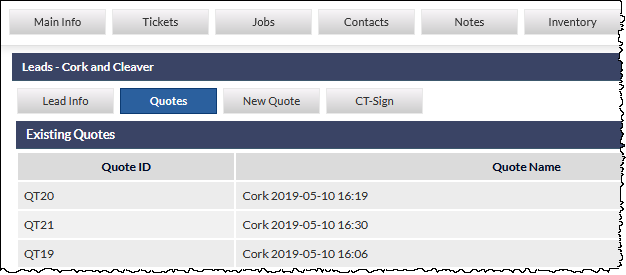
If more than one quote exists for the current Lead, the available quotes will be listed (as shown in the previous image). Clicking on one of the quotes will display the quote details. The Existing Quotes list is displayed alphanumerically by Quote Name.
If only a single quote exists for the current Lead, the quote details will be displayed immediately.
Creating a New Quote
New Quotes are created by clicking the New Quote tab in a selected Lead (visible in the previous image).
See article Creating / Modifying a Quote, for further information.
Quote Templates
Templates for producing printed (PDF) quotes can be created using the following types of templates:
- Standard Quote Template (created with Built-in HTML Editor)
- Template Toolkit
- Template Toolkit Library
Standard Quote Template (created with Built-in HTML Editor)
Standard quote templates are based on basic HTML layouts, which can be created within CommTrak using the Template Editor, which provides basic WYSIWYG editing, and also HTML editing.
The layout of the line items and totals in standard quote templates are fixed. For example, the order and width of the columns cannot be changed.
Template Toolkit
The Template Toolkit has been created to enable professional HTML (web page) designers to produce sophisticated quote templates, with virtually no limitations, in terms of layout of the quote.
On request, CommTrak Support will be pleased to supply the documentation for the Template Toolkit and provide more detailed information about the toolkit features.
Template Toolkit Library
The Template Toolkit Library contains several templates that have been created by a professional designer, using the Template Toolkit, and which can either easily be imported as ready-made templates for use as-is in the Quotes module, or be downloaded from CommTrak for editing and subsequent uploading as a Template Toolkit quote template.
Quote Settings
Because Quotes are directly related to other modules, including Leads and Inventory, the settings for quotes are located in the relevant settings section for each of those modules.
Please refer to Leads Settings and Inventory Settings categories in the Support Centre.