
Labour Rates Matrix (Settings)
The Labour Rates Matrix is referenced by CommTrak when calculating rates and costs associated with staff.
Labour Rates apply to:
- Productivity Activities
- Ticket Types
- Job Types
Default rates and costs can be applied to the Labour Matrix, whereby (for example) the hourly rate for a Job Type is the same for all staff who might be assigned to complete that type of Job, or, costs and rates can be overridden per staff member. For example, a specific staff member might be charged at a higher rate than the default rate.
IMPORTANT: By default, the labour charge rate for Jobs is determined based on the Job Type. This is to ensure backwards compatibility with settings that were configured prior to the implementation of the Productivity Activity features. To configure CommTrak to use the Activity rate, the relevant CommTrak setting must be set to Activity: Job Miscellaneous Settings - Preferred method of determining labour charge rate (refer to Labour Rates Matrix).
Accessing Labour Rates Matrix Settings
Settings > User Settings > Labour Rates Matrix
Modify the Labour Rates Matrix
The Labour Rates Matrix is presented as shown in the image below:
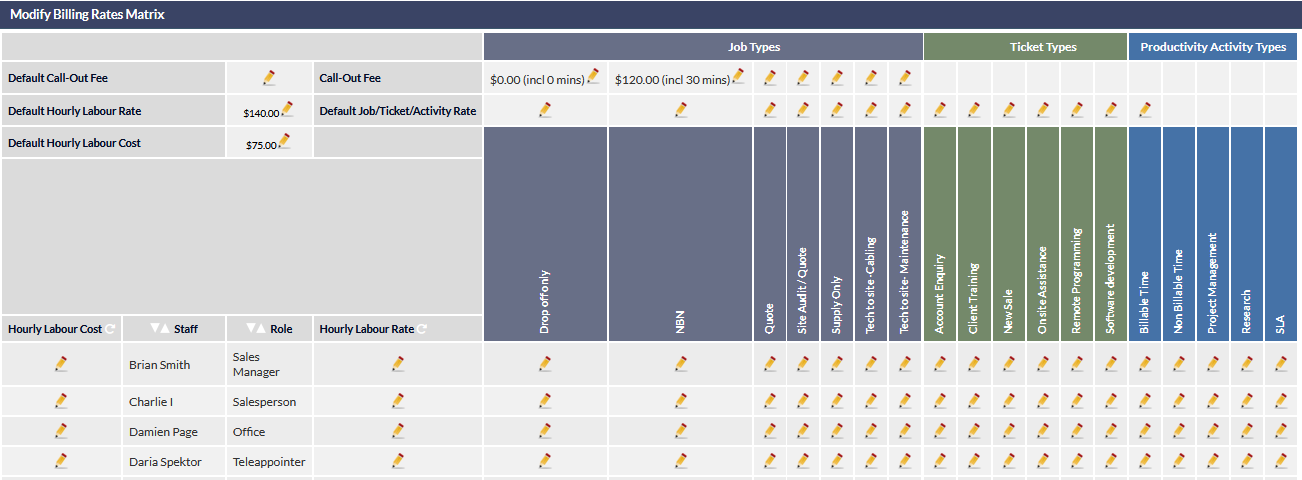 Modify Call-Out Fee for Jobs
 Modify Call-Out Fee for Jobs
Default Call-Out Fee
A default Call-Out Fee can be specified for all Job Types.
- Click the pencil icon adjacent to the Default Call-Out Fee label
- Choose a Default Call-Out Fee from the dropdown list
- Click anywhere else in the browser window to stop editing
The selected Call-Out Fee will be applied to all Job Types.
The Call-Out Fees that are displayed in the dropdown list are defined in the Support Centre article, Call-Out Fees (Settings).
Per Job Type Call-Out Fee
The following image is an extract of a sample Labour Rates Matrix. Configuration of Job Types and Ticket Types is documented in Job Types (Settings), and Ticket Types (Settings), respectively.
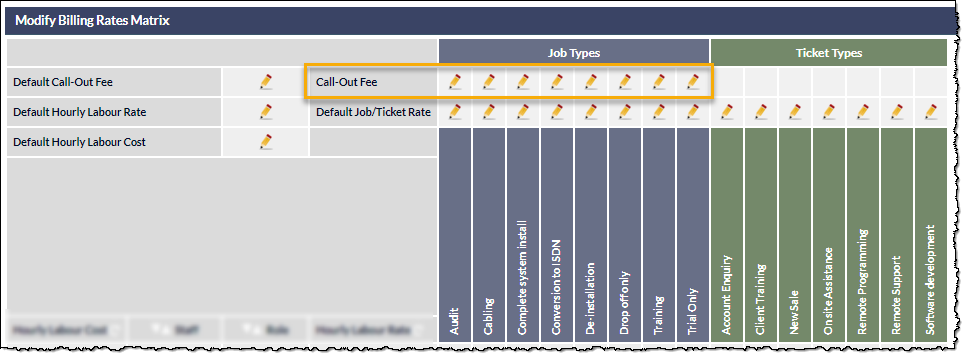
To modify the Call-Out Fee per Job Type:
- Click the pencil icon in the row adjacent to the Call-Out Fee label (as highlighted in the above image), where it intersects with the column for the relevant Job Type
- Choose a Call-Out Fee from the dropdown list
- Click anywhere else in the browser window to stop editing
The selected Call-Out Fee will be applied to the specific Job Type.
Modify Default Hourly Rates for Jobs, Tickets or Productivity Activities
Default Hourly Labour Rate
A default Hourly Labour Rate can be specified for all Job Types, Ticket Types and Activities.
- Click the pencil icon adjacent to the Default Hourly Labour Rate label
- Enter the hourly rate (numeric only)
- Click anywhere else in the browser window to stop editing
The specified labour rate will be applied to all Job Types, Ticket Types and Activities.
Default Job/Ticket/Activity Rate
A default labour rate can be specified per Job Type, Ticket Type, and Activity Type.
- Click the pencil icon in the row adjacent to the Default Job/Ticket/Activity Rate label, where it intersects with the column for the relevant Job Type, Ticket Type or Activity Type
- Enter the hourly rate (numeric only)
- Click anywhere else in the browser window to stop editing
The specified labour rate will be applied to the relevant Job Types, Ticket Types or Activity Types.
Modify Labour Costs for Staff
Default Hourly Labour Cost
A default Hourly Labour Cost can be specified for all staff.
- Click the pencil icon adjacent to the Default Hourly Labour Cost label
- Enter the hourly cost (numeric only)
- Click anywhere else in the browser window to stop editing
The specified hourly labour cost will be applied for all staff.
Hourly Labour Cost Per Staff
A default Hourly Labour Cost can be specified for each staff member. The following image shows the Hourly Labour Cost for the staff member Brian Smith, being edited:
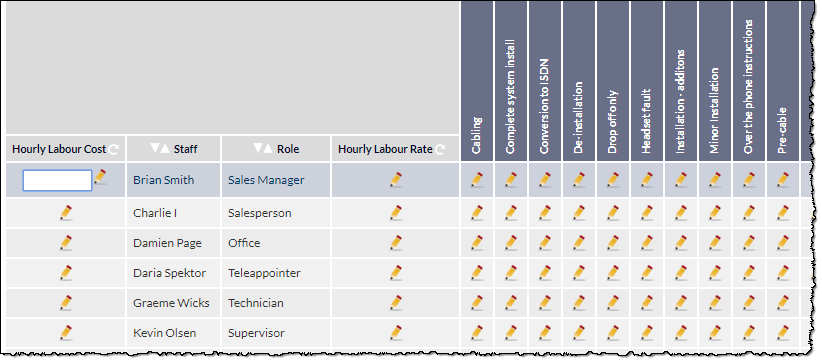
- Click the pencil icon to the left of the staff member's name
- Enter the hourly cost for the staff member
- Click anywhere else in the browser window to stop editing
The specified Hourly Labour Cost will be applied for the individual staff member.
Modify Labour Rates for Staff
Hourly Labour Rate Per Staff
A default Hourly Labour Rate can be specified per staff member, for all Job Types, Ticket Types and Activity Types.
- Click the pencil icon to the right of the staff member's name and role
- Enter the hourly rate for the staff member
- Click anywhere else in the browser window to stop editing
The specified Hourly Labour Rate will be applied for the individual staff member, for all Job Types, Ticket Types or Activity Types.
Modify Labour Rates Per Staff Per Job Type, Ticket Type or Activity Type
An Hourly Labour Rate can be specified per staff member, for each different Job Type, Ticket Type or Activity Type.
- Click the pencil icon in the row for the staff member, where it intersects with the column for the relevant Job Type, Ticket Type or Activity Type
- Enter the hourly rate for the staff member
- Click anywhere else in the browser window to stop editing
The specified Hourly Labour Rate will be applied for the individual staff member, for the specified Job Type, Ticket Type or Activity Type.
Resetting Hourly Labour Cost or Rate for All Staff
To reset the Hourly Labour Cost or Hourly Labour Rate for all staff, click the reset icon in the relevant column, as indicated in the following image:
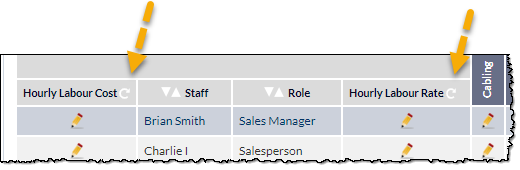
A prompt will be displayed requesting confirmation of the reset action.
Upon confirmation, all items in the selected column will be reset to default.
Allocation of Rates & Costs
Allocation of Rates
Labour Rates are allocated to Jobs, Tickets and Activities based on the following rules, and in the order specified below:
- If a rate has not been entered for a staff member, for a specific Job, Ticket or Activity type, the staff member's default rate will be applied.
- If a default rate has not been entered for a staff member, the rate allocated against a specific Job, Ticket or Activity type will be applied.
- If a rate has not been entered for a specific Job, Ticket or Activity type, the default hourly labour rate will be applied.
Allocation of Costs
If an Hourly Labour Cost has not been entered for a staff member, the Default Hourly Labour Cost will be applied.