
Transfer Responsibilities (User Settings)
Responsibilities for an existing user can be bulk transferred to different users.
Examples of transferring responsibilities are:
- If a salesperson is moving to a different division within your organisation, all records pertaining to their role as a salesperson can be transferred to another sales person.

- If a project manager is changing roles, all Projects to which the user is assigned can be transferred to another staff member.

Transferring Responsibilities
Settings > User Settings > Users
Select the user whose responsibilities you wish to manage
Select the Responsibilities tab, then the Transfer tab (which is selected by default):
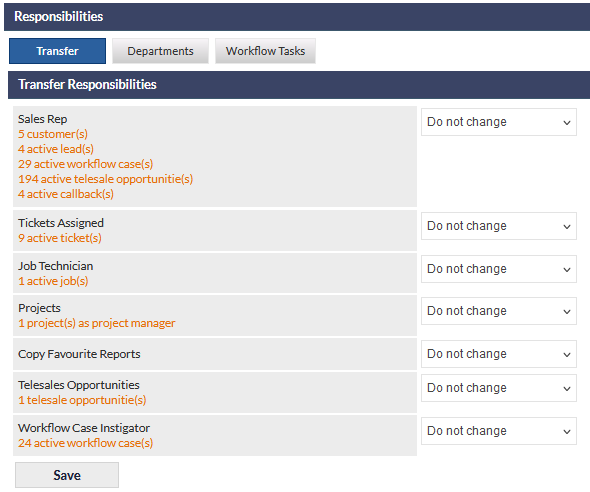
If your CommTrak has any Relationship Managers configured, they will also be displayed and can be reassigned.
Select a staff member's name in the dropdown list next to each responsibility, to indicate the person to whom it should be transferred.
To complete the transfer of responsibilities press the Save button. The transfer is immediate - no further prompt or warning is provided.
Once saved, transfer of responsibilities occurs immediately and cannot be reversed other than by manually reassigning the updated items.
Transfer of Workflow Tasks
When a staff member has been assigned to Workflow Tasks in the Workflow Task Settings, those task assignments can be reassigned to other staff members.
This feature affects only workflow cases that are instigated after the reassignment has occurred.
To transfer Workflow Task assignments for a user:
Settings > User Settings > Users
Select the user whose Workflow Tasks you wish to manage
Select the Responsibilities tab, then the Workflow Tasks tab:
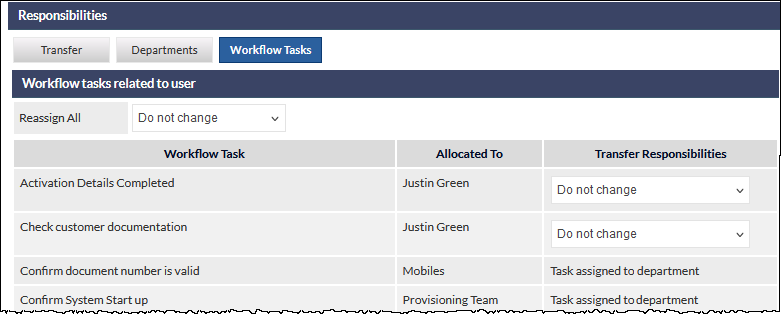
Where a task is assigned to the user, another staff member can be selected from the dropdown list in the Transfer Responsibilities column. The default is Do not change.
Where a task is assigned to a department of which the currently assigned user is a member, the Transfer Responsibilities column specifies Task assigned to department. This aids in identifying that the Workflow Department may need updating.