
Signable Quote Email Templates (Settings)
It is vital that all Signable Quote Email Templates include the %QUOTE LINK% placeholder.
The Signable Quote Email Templates setting provides for the creation and modification of email templates that are available when sending signable quotes to a contact.
The features available for editing a Signable Quote Email Template are the same as those for editing email templates within other areas of CommTrak.
Accessing Signable Quote Email Templates Settings
Settings > Leads Settings > Signable Quote Email Templates
Once in this settings section, please refer to the Email Templates (Settings) article for information about the available settings and features, ensuring that the %QUOTE LINK% placeholder is included in the template.
Quote Link Placeholder
All Signable Quote Email Templates must include the %QUOTE LINK% placeholder.
The quote link can be styled in the email as required for your organisation's requirements and branding, but it must be a clickable link (i.e. an HTML anchor tag with an href attribute containing the quote link placeholder):
<a href="%QUOTE LINK%" ...
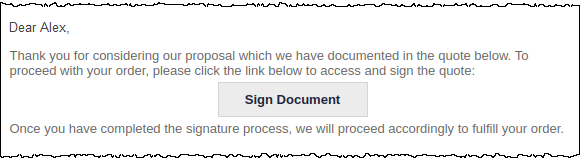
In the provided default template, the link is presented as a button, as shown in the following image:
Please refer to the HTML source in the default template provided in the Signable Quote Email Templates settings.