
Moving Leads
Under certain circumstances, a Lead can be moved to a different company name.
Please read the entirety of this article prior to attempting to move a Lead to a different Customer; it is important to understand the ramifications of moving a Lead (e.g. which data is or is not transferred with the Lead).
Examples of the need to move a Lead are:
- Lead has been associated with the incorrect Customer
- Lead has been created with an incorrectly-spelt Company Name
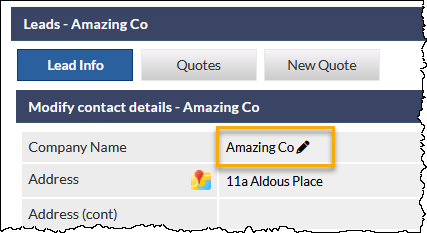
If a Lead can be moved, the edit (pencil) icon is displayed adjacent to the current Company Name in the Lead:
 Prerequisites for Moving a Lead
 Prerequisites for Moving a Lead
- Current user must have the Allow users to delete leads permission
- Lead must not be related to another CommTrak component (e.g. Job, Ticket, etc)
- Lead must be active (i.e. it must not have a status of Successful or Unsuccessful)
Moving a Lead
- Click the edit (pencil) icon adjacent to the Company Name
- Read the warnings in the prompt, and click or as appropriate
There is no undo feature; please ensure that you understand the ramifications of moving a Lead prior to clicking OK.
- Upon clicking OK, the Company Name field will revert to a CommTrak search field:

- Search for the Customer to which the Lead should be moved (a minimum of three consecutive characters are required for a match to occur):

- Select a Customer from the dropdown list
- The Lead will immediately be reassigned to the selected Customer:

What Data is Moved with the Lead?
Lead Contacts
When a Lead is moved, this feature will not move any contacts between the source and destination customer record. (I.e. if the source Lead has a contact assigned, the contact will not be moved to the destination Customer record).
However, during the move, CommTrak will attempt to match contacts between the source and destination records based on contact name, phone, mobile or email (i.e. if any of those fields in a contact from the source Lead matches the same fields for a contact in the destination Customer record, the first matching destination contact in the destination record will be selected as the Lead's contact). If no contacts are matched, the destination Customer's Sales Contact (derived from the destination Customer's Main Info screen) is selected as the Lead's new contact.
Any contacts specified in the Other Contacts section are not moved with the Lead.
Other Data
In addition to the Lead's Main Info and contacts information (as described in the previous section), the following data are moved with the Lead:
- Recurring sales figures
- CT-Sign sheets
- Quotes
Lead Move Failure
There are several reasons why the moving of a Lead may fail, including:
- Lead was generated from a Telesales opportunity
- Lead has a data sheet against it (as the data sheet may have been generated by the originating Telesales opportunity)
- Lead has documents attached
- Lead has inventory items dispatched
- Lead has inventory items ordered against it
- Lead is a Partner Lead, but the Partner differentiates between the two records the Lead is being moved from/to (only relevant when the Partner feature is enabled in CommTrak)
- Lead has services activated via the Telco quote Activations tab (only relevant when the Telco module is enabled in CommTrak)
If a failure occurs, a warning banner explaining the reason for the failure will be displayed. For example:
