
CT-Sign Questions (Settings)
This setting enables the creation and editing of questions that can be displayed in CT-Sign Templates.
The questions should be worded such that they can be answered with Yes, No, N/A, or with a comment. The following image shows an example of questions as presented in a CT-Sign Template:
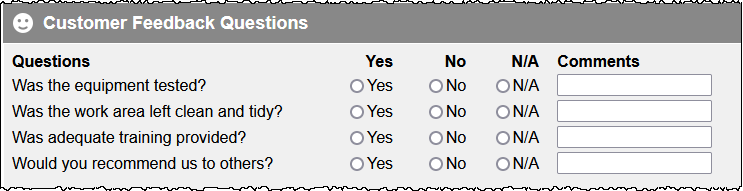
The formatting (e.g. colour, styles) depends upon the template design, and the above image is an example of a basic CT-Sign Template layout.
Accessing CT-Sign Questions Settings
Settings > Data Sheets & CT-Sign Settings > CT-Sign Questions
Add a CT-Sign Question
In the Add a CT-Sign question section, enter the question, which should be worded such that it can be answered with Yes, No, N/A, or with a comment.
Click to confirm; the question is added to the list of questions in the Select to modify a CT-Sign question section at the top of the screen.
The question can now be selected when creating or modifying a CT-Sign Template.
Modify a CT-Sign Question
Select a question in the Select to modify a CT-Sign question section at the top of the screen.
In the Modify a CT-Sign question section, edit the text of the question.
Click to confirm the changes.
Delete a CT-Sign Question
Select a question in the Select to modify a CT-Sign question section at the top of the screen.
In the Modify a CT-Sign question section, click . The question is deleted immediately, and this action cannot be undone.