
Bulk Reassign Ticket Status
This article focuses on bulk-reassigning the Status of active Tickets. For more information pertaining to the Active Tickets screen (including bulk-reassignment of other Ticket attributes), please see the Support Centre article, Active Tickets Screen.
The bulk-reassignment process is irreversible; there is no undo feature. Please use this feature with care.
This feature is available to users with appropriate permissions (Supervisor role, by default).
Use-Cases
- Bulk-cancelling tickets generated from spam emails
- Bulk-cancelling tickets generated during testing
- Bulk-updating to an alternative status for administrative purposes; for example, updating multiple tickets to reflect a status of Customer to Confirm
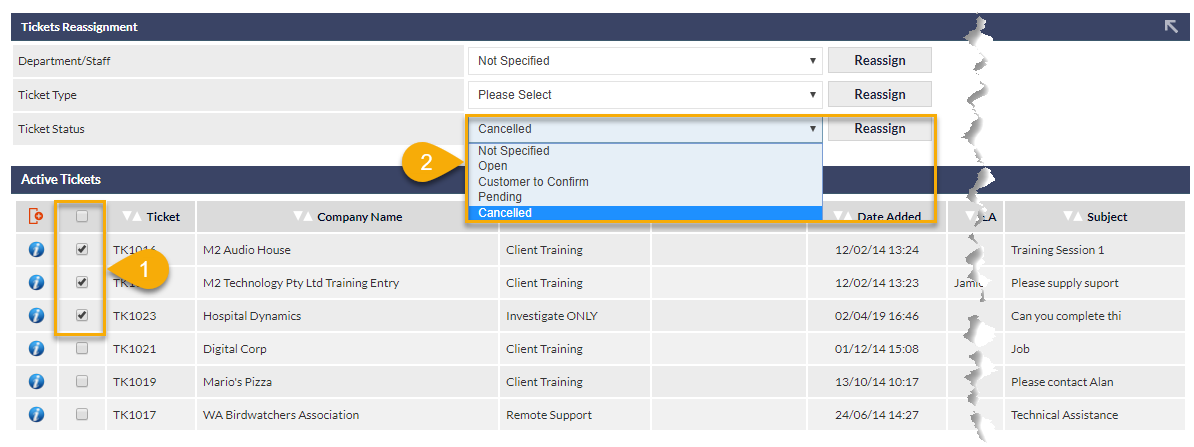
On the Active Tickets screen, display tickets as required, using appropriate search criteria (not shown in the above image), then:
1) Select the tickets for which the Status is to be changed. (Clicking the tick-box at the top of the column selects all Tickets currently displayed on-screen)
2) Select the required Status from the drop-down list, and click the adjacent Reassign button
Bulk Closing Tickets
It is not possible to bulk Close tickets, as a closed ticket implies resolution, and details should be provided for each case.
The only statuses available for bulk-reallocation are:
- Open
- Cancelled
- Other custom status, as configured in Ticket Statuses (Settings)
Tickets that have had their status bulk-reallocated will have a ticket note added automatically: Ticket status administratively changed.