
Expandable Sections
CommTrak features many expandable sections, providing the following features to enhance your experience:
- Easy access: Expandable sections provide easy access to less frequently accessed information.
- Personalisation: The state of each section is remembered based on a staff member's last usage, allowing them to continue where they left off.
Expandable Section Features
- Click Anywhere to Expand/Collapse: You can click anywhere on an expandable section header to expand or collapse the section.
- Colour-Coded: Expandable section headers are colour-coded, with a subtly lighter shade than the standard colour. For example, in the following image, the Tickets Search section header is a lighter shade of blue compared to the New Ticket section header:
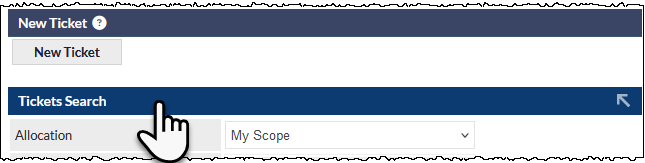
- Hover Effect: When you hover over an expandable section header, the mouse cursor changes from the standard arrow to a pointing hand cursor, indicating that the header is clickable (visible in the previous image).
- The Selected State is Remembered: The state of each expandable section is remembered. For example, if you expand a customer's More Info section, this section will be expanded for all customer records and will remain expanded until you choose to collapse it again.
Clickable Section Header Labels
Some section headers have a clickable label. For example, on a customer's Main Info tab:
- Clicking the Contacts summary header label navigates to the customer's Contacts tab
- Clicking the Inventory summary header label navigates to the customer's Inventory tab
Click the following image to display a larger version.

When hovering over a clickable section header label, the text of the label changes colour, and the cursor changes to the pointing hand to indicate that the label is a clickable link (visible in the previous image).
Clicking a section header link does not expand / collapse the section.