
Applications
The CommTrak Applications Settings are used for creating credentials for accessing API endpoints.
For example, if you use, or have created, a third-party application that can read and update CommTrak API endpoints, you must create an Application entry in CommTrak User Settings.
Once you have created an Application, you can use the credentials to access the CommTrak API.
Accessing Application Settings
Settings > User Settings > Applications
Add an Application
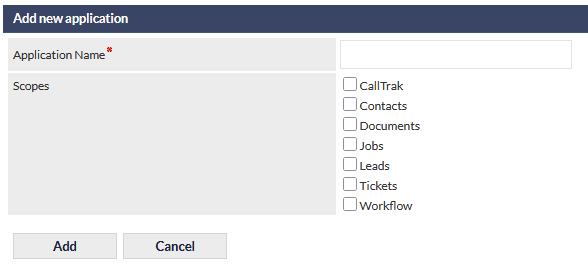
- Click New Application
- Enter a name for the application into the Add a new application field
- Specify the Scopes for the application (e.g. Contacts, Leads, Tickets, Workflows); you can select multiple scopes.
- Click the Add button
The newly created application details will be displayed:
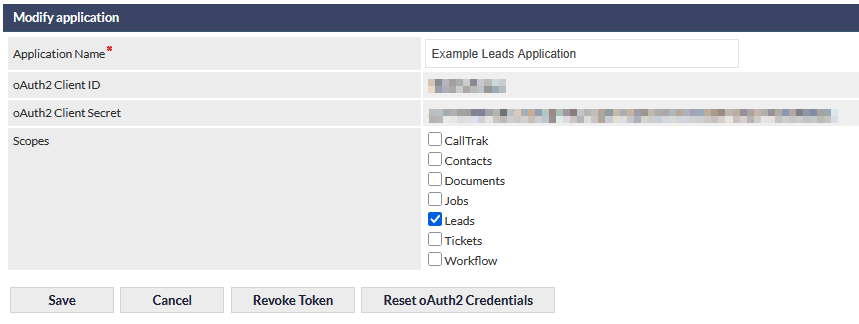
The oAuth2 Client ID and oAuth2 Client Secret are required to access the API as described in the following article: CommTrak API
Modify an Existing Application
- Select an application from the list displayed at the top of the settings screen
The available fields are as follows:
- Application name
- The oAuth2 Client ID and oAuth2 Client Secret (read-only)
- Scopes
Click Save to confirm any changes.
Delete an Existing Application
- Select an Application from the list displayed at the top of the settings screen
- Click the Delete button that is displayed below the Modify application section heading.
- Press OK to to confirm deletion or press Cancel to retain the application
Deleting an Application cannot be reversed.
Revoke Token
Clicking the Revoke Token button will immediately revoke the active access token (short-lived) token for this application.
For further information about the access token, refer to Support Centre article:
Reset oAuth2 Credentials
Pressing the Reset oAuth2 Credentials button prompts for confimation of resetting the oAuth2 Client ID and oAuth2 Client Secret. If confirmed, the credentials are reset immediately
Resetting an application's credentials cannot be reversed.