
Telco Unconfirmed Commissions Payable Report
To access this feature, select: Reports > Telco Commissions Reconciliation
This feature is used for calculating and managing payment of commissions to staff, when commissions are paid per product sold.
The following fields are available in the Specify unconfirmed commissions payable report criteria section:
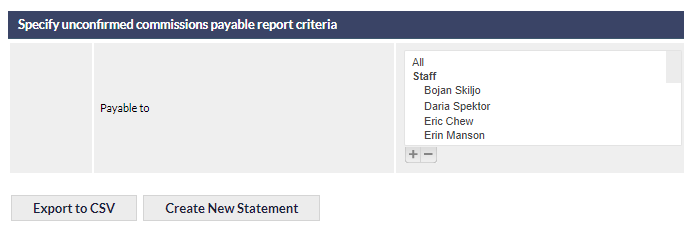
Payable to (default All)
This field determines which staff will be included in the report. By default the commissions report will include all staff.
Export to CSV
Clicking generates and downloads a CSV file containing the commission payments for staff, in your web browser.
Create New Statement
Clicking generates a pay-run report, which enables the verification of commission payments, in advance of the pay-run (See Support Centre article Telco Commissions Statement Report).
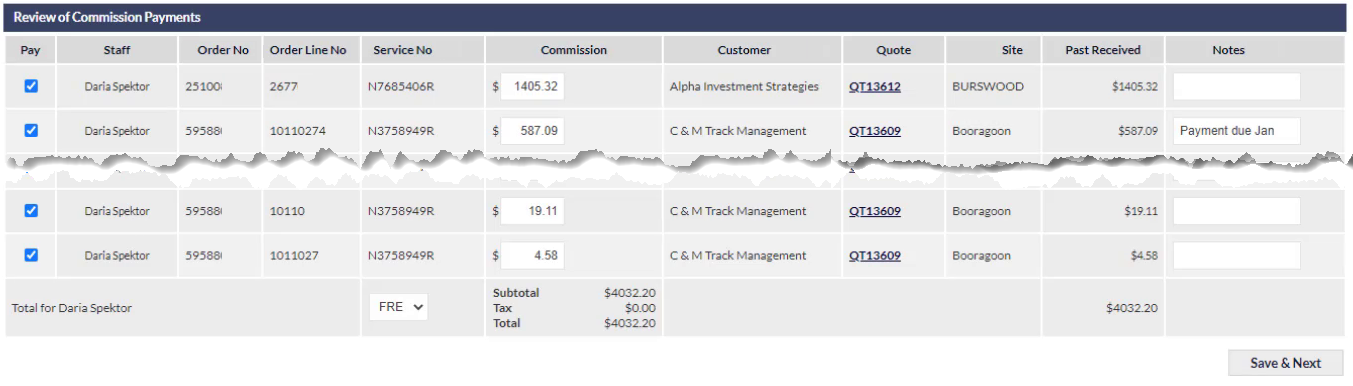
The pay-run screen (shown above) displays one staff member per page.
By default, payments are allocated to be paid, as designated by the tick in the first column. If a payment is not being made, untick the box for the relevant payment row.
The calculated commission is displayed in the Commission column, and the total of any previous payments made for this item is displayed in the Past Received column.
To confirm all the items for the currently-displayed staff member, click , which which will display the payments to be confirmed for the next staff member (if any).